- MBN
- In a Nutshell
- Overview
- Feature Overview
- Common Problems
- Solutions
- Media
- Summary
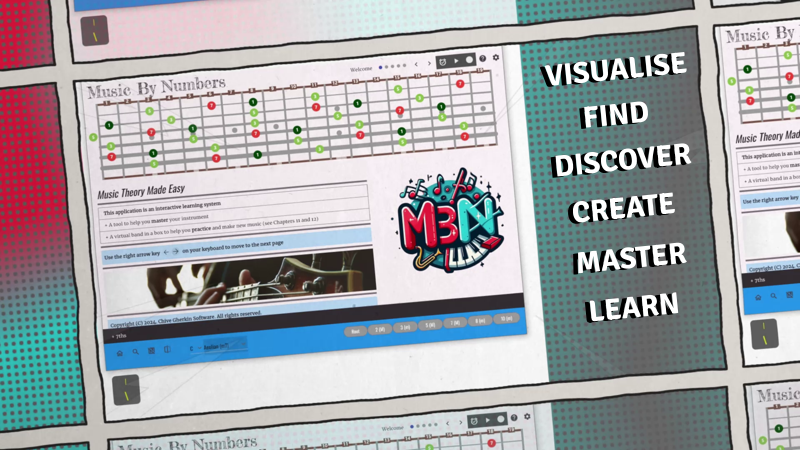
Scroll across the tabs above to see our [Overview], [Feature Overview], [Solutions], [Media] and [Summary] pages
VISUALISE
Scales, Chords and Modes
FIND
Chord tones and extensions
DISCOVER
The Modes of the major scale
CREATE
Progressions and melodies
MASTER
Changes and scale shapes
LEARN
Music theory fundamentals
MBN is a comprehensive, interactive learning experience and practice tool for musicians.
It caters to various stringed instruments, including guitar, bass and piano.
The software visualises musical concepts, such as modes, scales, chords, and their inversions, to aid in understanding and creating music.
It has been designed to simplify music theory.
MBN uses visualisations, such as colour-coded scale patterns, to make learning easier and more intuitive.
It offers features that enable real-time analysis, has recording capabilities, and multi-instrument split views for enhanced learning and composition.
It tackles common musician problems, from soloing and chord identification to understanding complex chord names and composing chord progressions, by providing interactive tools and accessible explanations.
The software’s aim is to demystify music theory, empowering musicians to improve their understanding, unlock creative potential and master their chosen instrument.
For Guitar, Piano, Bass Guitar, Ukulele, Banjo
Explore standard and alternate tunings
For 4, 6, 7, 8 stringed instruments
Visualise the 7 modes of the major scale
Highlight scale degrees, fretboard positions, string groups (single or multiple)
Discover new chords and inversions
See the CAGED shapes
Absorb patterns and relationships
Record a chord progression for a practice session or to make new music!
Synchronise recordings to your favourite songs
Play, understand and analyse in realtime
Make new ‘musical’ decisions based on the wealth of information provided
Visualise chord changes
Show pentatonic scales and shell chords
Split views to visualise different instruments at the same time (Guitar, Bass, Piano etc)
Synchronise multiple views to a common recording
Focus mode for multitasking and recording
Demystify and unlock the power of music theory
Master your instrument
Knowledge is power
1: Do you want to write your own songs?
2: Do you struggle to know what to play for your own solos or how to make them sound more interesting?
3: Do you want to follow along with your favourite songs but not quite sure what is going on musically?
4: Have you followed along with tablature and struggled to see any patterns between the notes?
5: Do you have to lookup new chord shapes and chord diagrams?
6: Have you learnt a myriad of chord shapes but not sure:
1: how or why they work together?
2: how each chord is actually constructed?
3: why that chord sounds a bit different to what I am playing?
4: what is the difference between a Major and Minor chord musically?
5: why those particular notes come together to make that chord?
6: how to adapt a chord to play a major 7th, minor 7th, dominant 7th, or sixth?
7: Have you learnt some of your favourite solo’s but not sure:
1: what key you are playing in?
2: what scales are being used?
3: what mode(s) are being used?
A list of common problems, issues and difficulties musicians face with information on how MBN can help
1: How do I know what notes to play for a solo?
MBN allows you to visualise your instrument with colour coded scale patterns.
The chord tones tones are highlighted in light green. The root note dark green.
See the scale degree number, to appreciate the note’s order and placement within the scale.
See the note number to determine the actual pitch using MBN notation.
2: I’ve learnt the TAB to my favourite songs but what am I actually playing?
MBN is a realtime visualisation tool as well as a knowledge base of music theory information.
Use MBN to analyse what you have already learnt and get a deeper understanding of what you are playing.
Chord changes can be recorded into the software and timings set to synchronise with your favourite songs. Now you can see the changes and supercharge your musical vocabulary.
3: I know simple chords - can I find my own chords?
Use MBN to select the root (tonic) of the chord and the major/minor quality. Apply the built in filter to show the chord tones only and unlock all of the shapes and inversions across your instrument.
Move through the filter options to find extensions to the chord e.g. the seventh, ninth etc.
4: What does C-9, Dmaj11, Gsus4 mean?
MBN breaks down seemingly complicated topics and makes them accessible. Concise chapters demystify concepts that once may have felt out of reach.
Use the visualisation tools to ‘play’ with music theory, see the patterns and solidify your knowledge.
5: How do I compose my own chord progressions?
The MBN dashboard updates to show the chords of the key to guide and inspire your creativity.
Use the inbuilt recording functions to capture your ideas and the onboard MIDI functions to make music!
Pair MBN with virtual instruments and the sonic possibilities are endless.
MBN includes specific chapters that discuss the ‘Virtual Band in a Box’ (onboad MIDI) functions and there is a chapter on ‘Recording Audio’ to help you get started.
6: What are the Modes?
MBN allows you to visualise the 7 modes of the major scale and understand their relationships.
You can use keyboard shortcuts to navigate between them and quickly highlight the differences.
Use these features to explore new sonic landscapes and musical opportunites.
Unlock elements in your playing that you didn’t even know existed!
7: But music theory is complicated?
Music By Numbers has been designed to make music theory easy and accessible to all.
Self contained chapters break topics down into manageable pieces using straight forward language and examples.
Unlock the knowledge to master your understanding of music and master your instrument!

- "Great for beginners as well as established players (of all ages)"
- "Experienced players - 'break on through' by supercharging your knowledge"
- "Learn music theory fundamentals"
- "On-screen tools to visualise and master your instrument"
- "Piano and Fretboard modes (Guitar / Bass / Ukulele / Banjo etc)"
- "Program your own backing band for practice sessions or to make new music"
- "Learn how to turn your computer into a recording studio"
- "Built by musicians, for musicians"
- "I wish I had this software when I was 15!"
- "Available now on Windows and Linux"